
GM7 Game: APK Download Guide, Features, Compatibility
5:18PM 10/7/2026
2mb
v4.2
Android
20M

Description
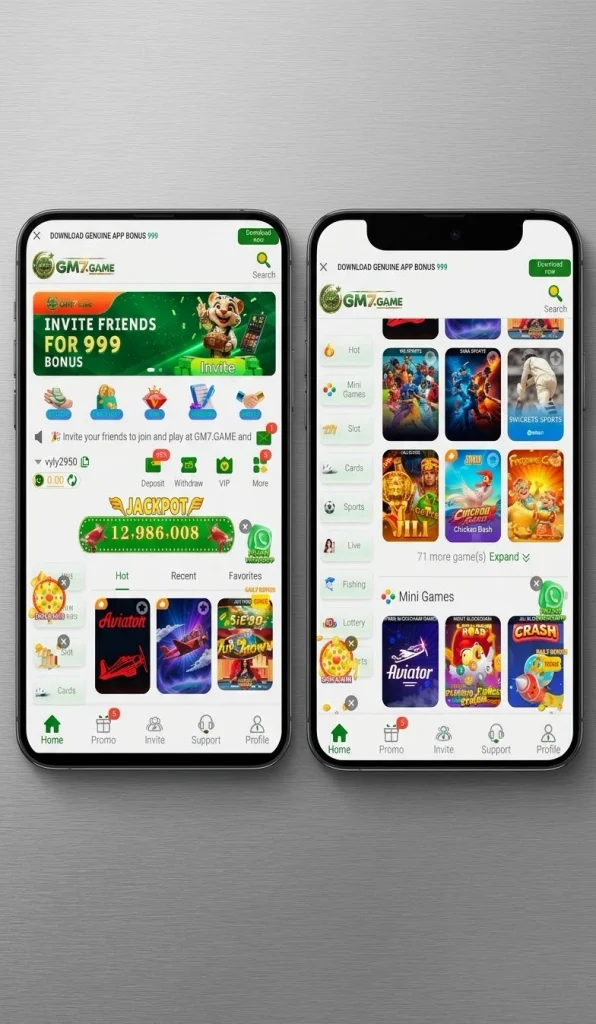
If you are researching gm7 game, it is important to understand how Android APK-based mobile casino applications work before installing one. Third-party apps can offer different interfaces and features from apps distributed through official app stores, but they also require additional attention to compatibility, permissions, updates, and security.
This guide explains the basics of 888pkr game files, Android requirements, app features, installation considerations, security checks, common problems, and safer alternatives. The goal is to help beginners make an informed decision rather than relying on promotional claims.
What Is an Android APK?
APK stands for Android Package Kit. It is the file format Android uses to distribute and install applications.
When an application is downloaded outside Google Play, it may be provided as an APK file. The file can contain the application code, resources, configuration information, and other components needed for installation.
An APK-based application is not automatically unsafe. However, the source of the file matters because third-party APKs may not receive the same review and distribution controls as applications available through official stores.
APK vs. Google Play Installation
| Factor | APK Installation | Google Play |
|---|---|---|
| Distribution | Usually from a website or third party | Official app marketplace |
| Installation | Manual | Usually automatic |
| Verification | User must investigate the source | Google provides platform-level checks |
| Updates | May require manual action | Usually handled automatically |
| Risk assessment | Requires extra caution | More standardized |
Understanding the App Before Installation
Before installing any third-party mobile application, identify where the APK came from and whether the website appears legitimate.
A useful Android APK guide should encourage users to check:
- The official developer or publisher
- The application’s stated purpose
- File size and version information
- Android version requirements
- Requested permissions
- Privacy policy and terms
- Update information
- Whether the download page uses HTTPS
- Whether security tools flag the file
Avoid assuming that an APK is legitimate simply because its website uses professional graphics or claims to be an “official” download.
Key Features to Examine
Features can vary between versions of third-party applications. Instead of relying only on advertising, users should examine how an application actually behaves on their device.
User Interface
A well-designed interface should make important functions easy to understand. Menus, buttons, account sections, and settings should have clear labels.
Pay attention to:
- Navigation speed
- Readability of text
- Loading behavior
- Menu organization
- Error messages
- Screen responsiveness
A complicated interface can make it harder to identify important account, privacy, or security settings.
Performance
Application performance depends on both the software and the smartphone.
A device with limited RAM or storage may experience:
- Slow loading
- App freezing
- Unexpected crashes
- Delayed screen responses
- Increased battery usage
Performance should therefore be evaluated on the actual device rather than assumed from promotional descriptions.
Account and Privacy Controls
If an application requires an account, examine what information it requests and why.
Be cautious when an app asks for permissions unrelated to its basic function. For example, an application should have a reasonable explanation for requesting access to sensitive device information.
Smartphone Compatibility Requirements
Before attempting APK file installation, check whether the application is compatible with your Android device.
Important technical factors include:
Android Version
Older applications may not work properly on newer Android releases, while newer applications may stop supporting outdated versions.
Check the minimum Android version specified by the developer before installation.
RAM
RAM affects how efficiently applications run alongside other programs. Devices with limited RAM may experience more frequent slowdowns when several applications are open.
Storage
Make sure sufficient storage is available. An APK’s displayed file size may not represent the complete amount of storage needed after installation and updates.
Processor Architecture
Some APK packages are designed for particular processor architectures. Compatibility can depend on whether the device uses ARM, ARM64, or another supported architecture.
Screen and Display
Most modern Android applications adapt to different screen sizes, but poorly optimized third-party apps may display incorrectly on certain devices.
APK Installation: What Beginners Should Know
Installing an APK is different from downloading an application through Google Play.
Android may display security warnings when an application comes from an unknown source. These warnings should not automatically be ignored.
Before proceeding, verify:
- Where the APK came from.
- Whether the publisher is identifiable.
- Whether the file is the expected version.
- Whether your Android version is supported.
- Whether the application requests reasonable permissions.
- Whether security software detects a problem.
- Whether the website provides clear privacy information.
If you cannot establish where an APK came from or who created it, the safer choice is not to install it.
Mobile App Security Checks
Security should be considered before installation, not after something goes wrong.
Check the Download Source
Use the developer’s known official distribution channel whenever one exists. Avoid random file-hosting websites, suspicious advertisements, or links sent through unknown accounts.
Scan the File
A reputable mobile security product can provide an additional check. However, a clean scan is not proof that an application is trustworthy.
Security scanning should be treated as one layer of verification, not a guarantee.
Review Permissions
Look carefully at permissions requested by the application.
Questions to ask include:
- Does the requested access relate to the app’s function?
- Is the application asking for unnecessary sensitive information?
- Can permissions be denied without affecting basic operation?
- Does the privacy policy explain data collection?
Check for Tampering
APK files can potentially be modified and redistributed. A file downloaded from an unknown source may not be identical to the developer’s original version.
Where available, compare:
- Version number
- File information
- Developer information
- Official download source
- Published checksums or signatures
Common Problems With Third-Party APKs
Users can encounter several technical problems when installing applications outside official stores.
“App Not Installed” Error
Possible causes include:
- Incompatible Android version
- Insufficient storage
- Corrupted APK
- Conflicting application version
- Unsupported processor architecture
Installation Is Blocked
Android may restrict installation from unknown sources depending on device settings and Android version.
Instead of disabling security protections permanently, first determine why the installation is being blocked.
App Keeps Crashing
Crashes can result from:
- Outdated application versions
- Device incompatibility
- Insufficient RAM
- Damaged installation files
- Server-side problems
- Android system changes
Slow Performance
Try closing unnecessary applications and checking available storage. If problems continue, the application may simply be poorly optimized for the device.
Third-Party APK vs. Official App
Users should understand the trade-offs before choosing an APK.
| Consideration | Third-Party APK | Official Store App |
|---|---|---|
| Installation | Manual | Usually automatic |
| Updates | May be manual | Usually easier |
| Source verification | User responsibility | More platform controls |
| Security risk | Potentially higher | Generally more standardized |
| Compatibility information | Varies | Usually clearly presented |
| Convenience | Depends on source | Usually higher |
This does not mean every third-party APK is malicious or every official-store application is completely risk-free. The important difference is the level of verification and distribution control.
Safer Alternatives to Consider
If your main goal is entertainment, consider applications distributed through established app stores or reputable websites with transparent ownership and privacy information.
Other alternatives include:
- Officially distributed mobile games
- Free-to-play entertainment games
- Browser-based games from reputable publishers
- Demo or practice versions where available
- Non-gambling casual games
For any application involving money or financial transactions, users should also check applicable laws, age restrictions, payment protections, and the provider’s terms before participating.
How to Evaluate an APK Before Downloading
A simple checklist can reduce avoidable risks.
Source Check
Find out who publishes the application and whether the publisher has a verifiable online presence.
Security Check
Scan the file and check whether reputable security services identify suspicious behavior.
Compatibility Check
Confirm the Android version, processor architecture, RAM requirements, and available storage.
Privacy Check
Read the privacy policy and examine requested permissions.
Update Check
Determine whether the application receives regular updates and how those updates are delivered.
Reputation Check
Look for independent information rather than relying entirely on testimonials published on the download website itself.
Safe App Usage Practices
Even after an application has been installed, continue to use basic security precautions.
- Keep Android updated.
- Use a screen lock.
- Avoid sharing account passwords.
- Do not reuse important passwords.
- Keep security software enabled.
- Review application permissions regularly.
- Remove applications you no longer use.
- Avoid downloading modified APKs from unknown sources.
- Never enter sensitive information into suspicious pages.
- Monitor financial transactions carefully.
What to Do Before Using a Money-Related App
Extra caution is necessary when an application involves deposits, withdrawals, or other financial activity.
Before providing payment information, verify:
- Who operates the service
- What company or organization is responsible
- Whether the service is legally available in your location
- What fees apply
- What withdrawal conditions exist
- How personal information is handled
- What happens if an account is suspended
- Whether customer support is identifiable
Never assume that claims such as “guaranteed earnings,” “instant withdrawals,” or “risk-free rewards” are factual simply because they appear on a promotional page.
Frequently Asked Questions
What is an APK file on Android?
An APK is the package format used to install applications on Android devices. Apps distributed outside Google Play may be provided as APK files.
Is every third-party APK safe?
No. Safety depends on the source, application code, permissions, publisher, and whether the file has been modified or compromised.
How can I check APK security?
Use a reputable security scanner, verify the publisher and source, examine permissions, and compare the application’s information with information from a trustworthy distribution channel.
Why won’t an APK install on my phone?
Common causes include an incompatible Android version, insufficient storage, a corrupted file, an existing conflicting version, or unsupported processor architecture.
Does an APK work on every Android phone?
No. Smartphone compatibility depends on Android version, processor architecture, available storage, RAM, and how the application was developed.
Should I install an APK if Android shows a warning?
Do not ignore the warning automatically. First determine why Android is blocking or warning about the installation and verify the application’s source.
Can an APK contain malware?
Yes. A malicious APK can potentially contain harmful software. This is why downloading applications from unknown sources carries additional security risks.
Are official app stores completely risk-free?
No platform can guarantee that every application is completely risk-free. However, established app stores generally provide additional review and security mechanisms compared with completely unknown download sources.
Final Thoughts
Understanding how APK files work is more useful than simply searching for a download button. Before installing any third-party Android application, check its source, compatibility, permissions, privacy practices, and security status.
For beginners, the safest approach is to prefer transparent developers, reputable distribution channels, current Android security protections, .