
999xa Game APK: Complete Guide to Safety, Security & Android
3:9PM 10/8/2026
1mb-3mb
v1.4
Android & iOS
100K+

Description
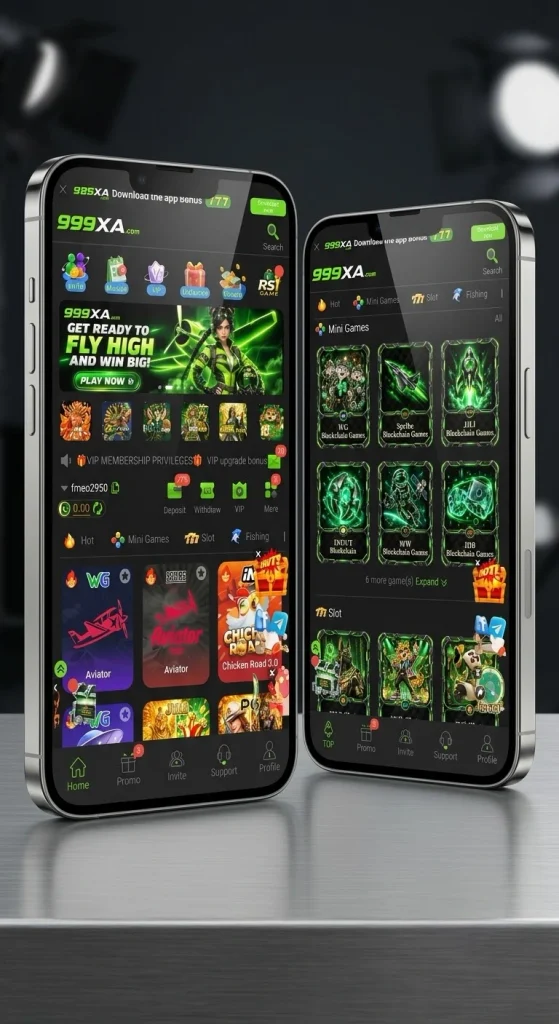
Mobile casino applications are often distributed as 87.club game files rather than through the Google Play Store. For Pakistan mobile users, understanding how these files work is important before installing any third-party gaming application. 999xa game may be searched by users looking for information about an Android-based gaming app, but availability, features, and legitimacy can vary depending on the source.
This guide explains what an APK is, how third-party mobile gaming apps work, what permissions to review, and which security checks to complete before installation. It also covers payment-related risks and practical ways to evaluate whether an APK source is trustworthy.
What Is an APK File?
APK stands for Android Package Kit. It is the file format Android uses to distribute and install applications.
Apps downloaded from Google Play are normally installed automatically through the Play Store. An APK, by contrast, can be downloaded from a website or another source and installed manually.
An APK may contain:
- Application code
- Images and other resources
- Configuration files
- Digital signing information
- Components required for the application to operate
Because APK files can come from outside official app stores, users should pay particular attention to their source and security.
How Third-Party Gaming APKs Work
A third-party gaming APK generally follows the same basic process as other Android applications.
After installation, the application may connect to an online server to provide account features, game content, updates, or other services. This means that installing the APK is only one part of the overall system.
Users should distinguish between:
- The APK file — the software package installed on the phone.
- The application server — the online service the app communicates with.
- The user account — information associated with an individual’s activity.
- Payment services — external or integrated systems used for financial transactions.
An APK being installable does not automatically mean that the service behind it is legitimate or secure.
Android Compatibility
Compatibility depends on the application’s technical requirements and the Android version installed on a device.
Before installing an APK, check:
- Minimum Android version
- Required storage space
- Whether the application supports your device architecture
- Whether your device has sufficient RAM
- Whether an internet connection is required
- Whether the application is designed for phones or tablets
If an APK fails to install, repeatedly crashes, or requests unusual access, do not assume that reinstalling it will solve the problem. The file itself may be incompatible, damaged, outdated, or unsafe.
APK Installation Considerations
Android devices can restrict installations from sources outside the Play Store. Users should be cautious about changing these settings simply to install an unknown application.
Before installing any third-party APK:
- Confirm where the file came from.
- Check whether the publisher is clearly identified.
- Look for a legitimate privacy policy and terms of service.
- Scan the file with reputable security software where possible.
- Check whether the application has a verifiable digital signature.
- Avoid modified or “unlocked” versions from unknown websites.
- Keep Android and security software updated.
A website offering an APK should not be considered trustworthy merely because it appears professional.

Check App Permissions Carefully
Permissions can reveal a lot about an application’s behavior.
A gaming application may reasonably need internet access, but requests for unrelated sensitive information deserve closer examination.
Be cautious if an app requests access to:
- Contacts
- SMS messages
- Call history
- Microphone
- Camera
- Precise location
- Accessibility services
- Device administration
- Files unrelated to its normal operation
The exact permissions available depend on the Android version and application design. Users should ask whether each requested permission is actually necessary for the app’s stated purpose.
Privacy and Data Security
Privacy is one of the most important considerations when using a third-party mobile application.
Before creating an account, look for a privacy policy explaining:
- What personal information is collected
- Why the information is collected
- Whether information is shared with third parties
- How long information is retained
- How users can request deletion
- What security measures are used
Avoid providing unnecessary personal information simply because an application requests it.
Never give an unfamiliar application access to passwords, authentication codes, or other sensitive account information unless you have independently verified the service.
Payment-Related Concerns
Payment activity creates additional risks because money and personal information may be involved.
Before making any payment, users should verify:
- The legal identity of the service provider
- Available payment methods
- Applicable fees
- Withdrawal conditions
- Refund policies
- Transaction records
- Customer-support contact information
- Whether the service is legally permitted in their jurisdiction
Do not assume that a payment screen is legitimate just because it uses familiar branding.
Be particularly careful with requests to send money directly to personal accounts, cryptocurrency wallets, or unofficial intermediaries.
APK Verification and Security Checks
APK verification can reduce the chance of installing a malicious or tampered application.
Useful checks include:
1. Verify the source
Download software only from a source that can be independently verified. Be suspicious of websites that constantly change domains or provide no information about the publisher.
2. Check the file
Security services can sometimes identify known malicious APKs. A clean scan does not guarantee that an application is safe, but a positive malware detection is an important warning.
3. Check the developer
Look for a consistent developer or company identity across the website, application, privacy policy, and support channels.
4. Avoid modified APKs
Files advertised as “mod,” “premium unlocked,” or “hacked” versions carry additional security risks because their contents may have been altered.
5. Review independent information
Look for credible user reports and security information rather than relying entirely on testimonials published by the APK website itself.
How to Identify a More Trustworthy APK Source
No single website feature proves that an APK is safe. Instead, look for several independent indicators.
A more credible source should provide:
- Clear developer information
- A functioning privacy policy
- Terms and conditions
- Transparent contact details
- Consistent application information
- Clear version history
- Security information
- No unrealistic promises about winnings or financial returns
Be cautious when a website uses pressure tactics such as countdown timers, fake warnings, or claims that users will definitely make money.
Common Warning Signs
Some warning signs are particularly important for Pakistan mobile users.
Avoid rushing into an installation when you see:
- Guaranteed winnings
- “100% safe” claims without evidence
- Fake-looking security badges
- Unclear company ownership
- Requests for excessive permissions
- Unknown payment recipients
- Pressure to deposit immediately
- Requests for passwords or verification codes
- APK files distributed through suspicious advertisements
- No privacy policy or terms
- Multiple unexplained redirects
These signs do not automatically prove that an application is malicious, but they justify stopping and investigating further.
Is an APK Automatically Unsafe?
No. An APK is simply an Android application package format.
The important issue is where the APK came from and what it contains. Legitimate developers can distribute APK files outside Google Play for legitimate reasons.
However, third-party APKs can carry greater risk because users may not receive the same level of automated review and distribution controls associated with official app stores.
Mobile Gaming and Responsible Use
Users should also consider the financial and legal aspects of casino-style applications separately from technical security.
An application can be technically safe while its underlying service may still present financial, privacy, or legal concerns.
Before using any real-money gaming service, check the laws and regulations that apply to you in Pakistan and avoid spending money you cannot afford to lose. Never treat gambling as a reliable source of income.
What Should You Check Before Installing?
A simple checklist can help:
Before installation
- ☐ Verify the developer and source.
- ☐ Check the Android compatibility requirements.
- ☐ Review requested permissions.
- ☐ Read the privacy policy.
- ☐ Look for terms and conditions.
- ☐ Scan the APK with reputable security tools.
- ☐ Avoid modified APK versions.
- ☐ Check independent information about the service.
Before making a payment
- ☐ Verify the payment recipient.
- ☐ Understand fees and withdrawal conditions.
- ☐ Keep transaction records.
- ☐ Never share passwords or authentication codes.
- ☐ Check whether the service is legally available to you.
Frequently Asked Questions
What does APK mean?
APK means Android Package Kit. It is the file format used to install applications on Android devices.
Is every third-party APK dangerous?
No. APK files themselves are not inherently dangerous. The main concern is whether the file has been modified or obtained from an unreliable source.
How can I check an APK before installing it?
Check its source, developer information, digital signature where available, requested permissions, and security scan results. Avoid installing files from suspicious websites.
Why do some Android apps require unusual permissions?
Some permissions may be necessary for particular functions, but unrelated permissions can create privacy risks. If an application requests sensitive access without a clear reason, reconsider installing it.
Can an APK steal personal information?
A malicious application can potentially collect sensitive information if it has the necessary access. This is why permissions, source verification, and security scanning are important.
Are mobile casino applications legal in Pakistan?
The legal status of gambling and casino-style services can depend on Pakistani law and the specific activity involved. Users should verify the current applicable laws rather than assuming that an application’s availability makes its use legal.
Should I use a modified or unlocked APK?
It is safer to avoid modified APKs from unknown sources. Altered software can contain unwanted code and may not receive reliable security updates.
What is the safest approach to third-party Android apps?
Use official app stores or the developer’s verified distribution channel whenever possible. If you must use a third-party APK, independently verify the source, review permissions, scan the file, and avoid providing unnecessary personal or payment information.
Final Thoughts
Searching for information about a mobile gaming APK should not begin with promises of bonuses or guaranteed winnings. The more useful approach is to evaluate the software itself: where it comes from, what permissions it requests, how it handles personal data, and whether its payment and ownership information can be independently verified.
For Pakistan mobile users, these checks are especially important when an application involves real money. A few minutes spent on APK verification and app security can help reduce avoidable privacy, malware, and financial risks.